
Batch encryption
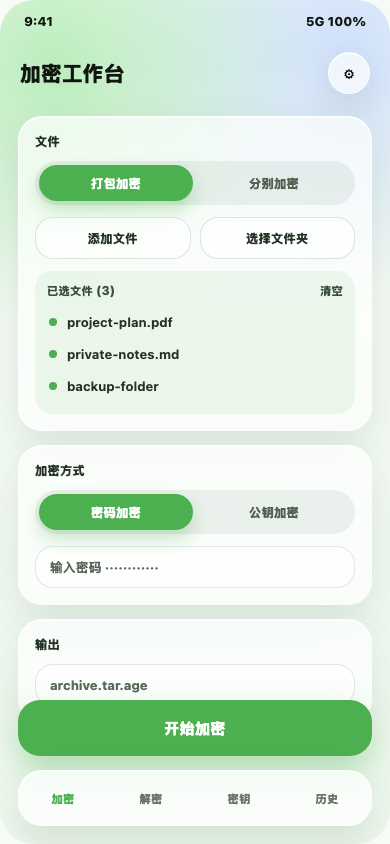
Pack selected files and subfolders into tar or tar.gz; selected folders can be encrypted as standalone archive units.
Latest public release v3.0.1
Encrypt folders as visible tree units, decrypt archives back into their original structure, manage age keys, and keep every file operation on your Android device.
What it does
Age Android pairs Jetpack Compose with a local Go age engine, configurable Liquid Glass accents, and clean tree views so large file work stays streamed, visible, and under your control.
Pack selected files and subfolders into tar or tar.gz; selected folders can be encrypted as standalone archive units.
Decrypt .age files and restore packed content as a readable file tree in the chosen output directory.
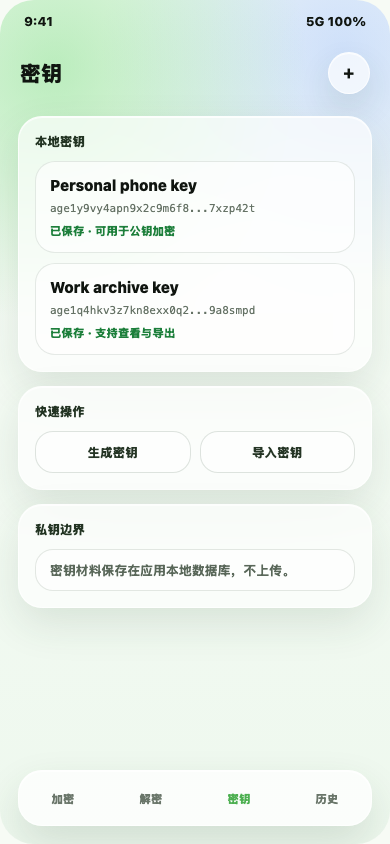
Generate, import, view, and use X25519 age key pairs without sending secret material off device.
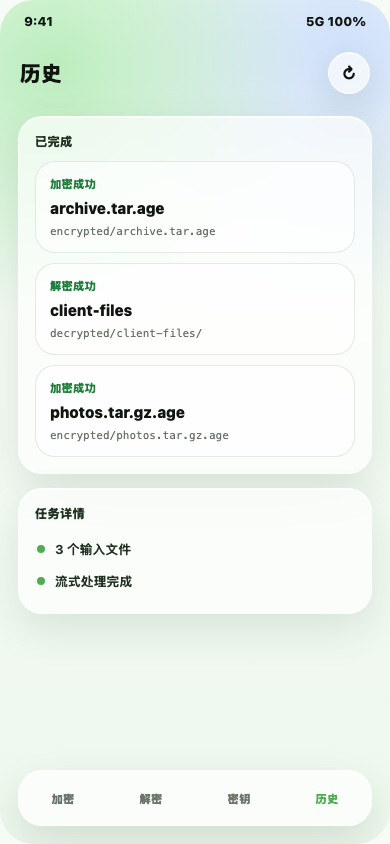
Review completed encryption and decryption work with status, paths, and tree-structured file details.
Android-native flow
The app uses Android's storage access framework, Compose surfaces, bottom navigation, and local app storage instead of a remote upload flow.
Local privacy boundary
Age Android does not collect analytics, upload files, or transmit keys. The app uses Android storage access only for files you choose.
Screenshots
These product previews mirror the current Compose surfaces for encryption, key management, and operation review.
Download
Universal is the easiest choice for most users. ABI-specific builds are smaller and match the device architecture directly.